If your business uses tools like a CRM, email platform, forms, spreadsheets, payment systems, and team chat, you’ve probably felt the pain of “tool overload.” Important data lives in different places. Teams copy and paste the same info again and again. Small mistakes turn into big problems—missed leads, wrong invoices, late follow-ups, and messy reports.
That’s where Make.com helps. It connects your apps and automates your workflows so work moves on its own. But while Make is easier than custom coding, real automation still needs clear planning and clean execution. This is why many companies hire Make.com agencies—specialist teams that build reliable integrations and process automation that actually fits your business.
This article explains what top Make.com agencies do, what to look for, and how to choose the best partner.

What a Make.com agency does
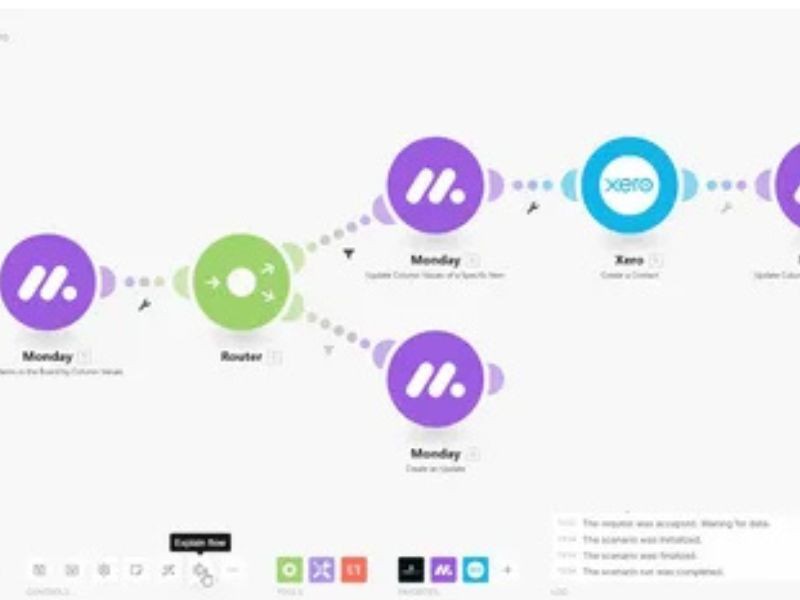
A Make.com agency designs and builds “scenarios” that connect your tools and run tasks automatically. They don’t just link apps. They make sure the workflow is correct, safe, and easy to maintain.
A strong agency typically helps with:
-
Process mapping: understanding your steps, people, and handoffs
-
App integrations: connecting tools like HubSpot, Salesforce, Shopify, Stripe, Google Sheets, Slack, Gmail, Airtable, WordPress, and more
-
Custom API connections: when a tool isn’t supported directly

-
Data cleanup and syncing: preventing duplicates and keeping records accurate
-
Error handling and alerts: so failures don’t go unnoticed
-
Documentation and training: so your team can understand and manage workflows
-
Ongoing maintenance: updates, monitoring, fixes, and improvements over time
Why businesses hire Make.com agencies
You can build basic scenarios yourself. But once automations touch revenue, customer data, or daily operations, mistakes get expensive.
Companies hire Make.com agencies because they want:
Faster results
An experienced team can build in days what takes internal teams weeks of trial and error.
Fewer mistakes
Agencies that focus on automation know the common traps: duplicate records, wrong triggers, missing filters, and workflows that break quietly.
Better reliability
Top agencies don’t just “make it run.” They add fallbacks, logs, alerts, and clear ownership so workflows keep working long-term.
Clean scaling
As your business grows, you need automation that can handle more volume without turning into a tangled mess.
What makes a “top” Make.com agency?
The best Make.com agencies tend to share the same strengths:
1) Strong integration skills
They understand webhooks, APIs, authentication, data fields, and how different tools handle updates.
2) Clear process thinking
They ask smart questions before building:
-
What starts the workflow?
-
What is the “source of truth” for data?
-
What happens when a step fails?
-
Who should be notified?
-
What is the success metric?
3) Quality control
They test scenarios, handle edge cases, and avoid hacks that cause problems later.
4) Documentation
They leave you with a clean system and simple notes—so you aren’t stuck when you need changes.
Services you should expect from top agencies
Here are the most useful Make.com services businesses pay for:
Workflow and scenario planning
Before building, the agency maps the full process. This avoids automating a broken process or missing important steps.
CRM automation
Common builds include:
-
Lead capture → CRM creation → assignment → follow-up tasks
-
Pipeline stage updates → notifications → record syncing
-
Form submissions → dedupe checks → sales routing
Marketing automation
Examples include:
-
New lead → add to email list → tag by interest → send welcome email
-
Webinar registrations → reminders → attendance sync → follow-up sequences
E-commerce automation
Make.com agencies often build:
-
Order events → customer updates → inventory sync → accounting entries
-
Refund events → CRM notes → email alerts → reporting logs
Finance and billing workflows
Typical automations:
-
Stripe payment → invoice creation → CRM update → team notification
-
Overdue invoices → reminders → internal alerts → dashboard updates
Reporting and dashboards
Top agencies can pull data from multiple tools into one place so reports are accurate and updated automatically.
Custom API integrations
If an app doesn’t have a built-in module, agencies can use HTTP requests, webhooks, and custom logic to connect it safely.
Common Make.com workflows that save the most time
If you’re wondering what a Make.com agency might build for your team, here are popular workflows that usually deliver fast ROI:
-
Lead capture automation: form → enrichment → CRM → Slack alert → assignment
-
Client onboarding: signed deal → create folders → create tasks → send welcome email
-
Support automation: ticket form → route by category → notify owner → escalation rules
-
Content operations: new brief → tasks → deadlines → approvals → status updates
-
Team reminders: missed steps → follow-up tasks → daily summary to Slack
-
Data cleanup: detect duplicates → merge records → update systems
How to choose the right Make.com agency
Use these steps to make a smart choice:
Step 1: Start with your “must-have” workflows
List 3 to 5 processes that waste the most time or create the most mistakes. This gives the agency something real to estimate.
Step 2: Ask for similar examples
A good agency should show past work that looks like your setup, not generic screenshots.
Step 3: Check how they handle failures
Ask: “What happens when a step fails?”
Top agencies will talk about:
-
retries
-
error routes
-
logging
-
alerts
-
manual fallback steps
Step 4: Make sure they plan for data quality
Ask how they avoid duplicates and ensure the right fields map to the right places.
Step 5: Confirm documentation and handover
You should receive:
-
scenario names that make sense
-
a short workflow map
-
notes on key modules and filters
-
basic troubleshooting steps
Pricing: what to expect from Make.com agencies
Pricing depends on complexity, number of tools, and the level of custom API work.
Common pricing models:
-
Fixed project pricing for a defined set of scenarios
-
Monthly retainer for ongoing support, monitoring, and improvements
-
Hourly support for small changes and troubleshooting
If you need automation to stay stable, a monthly retainer often makes sense because workflows need small updates as tools change.
Questions to ask before you hire
Here are questions that quickly reveal whether a team is experienced:
-
How do you handle scenario errors and failed runs?
-
Will you set up alerts so we know when something breaks?
-
How do you prevent duplicate records across tools?
-
Can you connect tools using APIs if a module doesn’t exist?
-
What documentation will we get at the end?
-
What does support look like after launch?
-
How do you test scenarios before going live?
Final thoughts
Make.com is one of the best ways to connect your tools and automate work without building custom software. But the real value comes from building workflows that are clear, reliable, and easy to manage.
The best Make.com agencies don’t just build scenarios. They build systems you can trust—so your team spends less time copying data and more time doing real work.
If you want, share your tool stack (for example: HubSpot + Stripe + Google Sheets + Slack), and I’ll suggest 10 automation ideas you can add as examples in your article.