Introduction to Wink Video Editor
A Quick Overview
Wink Video Editor is rapidly becoming one of the most popular and trusted video editing apps for Android users worldwide. Designed with both beginners and professionals in mind, it delivers a perfect balance of simplicity and advanced capabilities. At its core, Wink is more than just a trimming and cutting tool—it’s a complete video creation suite that allows you to craft professional-quality videos without the need for expensive software or powerful computers.
The app is optimized for mobile performance, which means even if you have a mid-range Android phone, you can still edit 1080p or even 4K videos with smooth performance. It also offers an intuitive interface that ensures you spend less time figuring out how the app works and more time actually editing. From quick Instagram reels to polished YouTube videos, Wink can handle it all.
What sets Wink apart from most Android editors is its powerful rendering engine, which maintains high-quality output without pixelation or loss of detail. Whether you’re editing a vlog, a product showcase, or a cinematic short film, you’ll appreciate the attention to quality and precision.
Why Android Users Love Wink
There are dozens of video editors on Google Play, so why are Android users gravitating toward Wink? The answer lies in its perfect blend of power and portability. Unlike some heavy editors that demand flagship-level devices, Wink runs smoothly even on budget smartphones, making it accessible to a much wider audience.
Android users love Wink because it adapts to their workflow. You can start editing a video during your commute, add effects during lunch, and finish your project at home—all on your phone. The app also integrates seamlessly with Android’s file system, meaning you can pull media directly from your gallery, cloud storage, or even your camera app without extra steps.
Moreover, Wink’s updates are frequent, with developers actively listening to user feedback. This keeps the app fresh, bug-free, and up-to-date with the latest editing trends like AI-powered auto-cut, background removal, and motion tracking.
Key Features That Make Wink Stand Out
User-Friendly Interface
When you first launch Wink, you’ll notice its clean and minimal design. The main editing timeline is straightforward, with clear icons for trimming, splitting, and adding effects. The buttons are large enough to tap easily without accidentally pressing the wrong tool—a common frustration with other apps.

Even if you’ve never edited a video before, you can figure out Wink’s basics within minutes. The interface uses a logical workflow: import your media, arrange your clips, apply edits and effects, then export your masterpiece. There’s no clutter or unnecessary complexity.
For seasoned editors, Wink still offers quick access to advanced tools like multi-layer editing, chroma key, and motion adjustments. This combination of simplicity and depth makes Wink equally valuable for casual users and professional creators.
Advanced Editing Tools for Professionals
Wink may look beginner-friendly, but under the hood, it packs a serious punch. Professional editors will appreciate tools like:
-
Multi-track editing – Layer multiple video and audio clips for complex compositions.
-
Keyframe animations – Create smooth, customized movements for text, images, or effects.
-
Chroma key (green screen) – Replace backgrounds with custom images or videos.
-
LUT color grading – Apply cinematic color tones with precision.
-
Audio mixing – Balance dialogue, music, and sound effects seamlessly.
The beauty is that these tools are not hidden behind complicated menus—they’re accessible right from the main workspace.
AI-Powered Editing Assistance
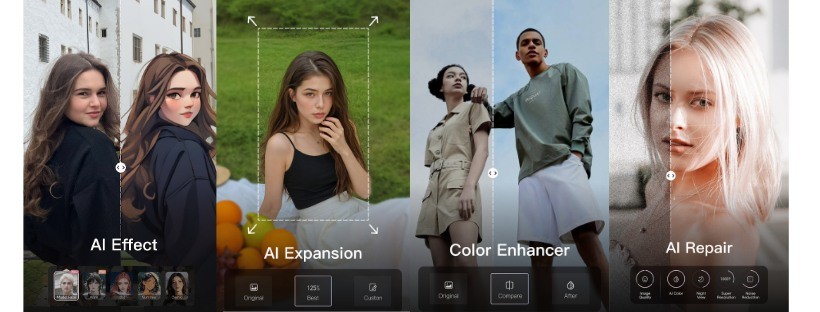
AI integration is one of Wink’s standout features. For example, its Auto Cut feature can scan your footage and automatically remove silent or boring sections, making the editing process much faster. AI-powered background removal is perfect for TikTok and Instagram creators who want to film anywhere and instantly replace their backdrop.
Wink’s AI also helps with auto captioning, which transcribes speech into editable subtitles in seconds. This is a game-changer for content creators targeting social media, where captions boost engagement and accessibility.
Ease of Use – Perfect for Beginners and Pros
Simple Drag-and-Drop Functionality
Wink allows you to arrange clips by simply dragging and dropping them on the timeline. This feature is perfect for beginners who may find traditional editing intimidating. You can trim, cut, and rearrange clips with just a finger swipe.
What’s impressive is how responsive the drag-and-drop system feels, even when working with large files. The app uses smart caching to keep everything smooth, which is a big advantage on mobile devices.
One-Tap Effects and Transitions
Transitions can make or break a video’s flow, and Wink offers dozens of stylish options you can add with a single tap. Whether you want a cinematic fade, a glitch effect, or a smooth slide, there’s something for every mood.
For quick edits, you can apply preset templates that automatically add transitions, color grading, and background music to your footage. This is great for people who want high-quality results but don’t have time to tweak every detail.
Professional Editing Capabilities
Multi-Layer Video Editing
Multi-layer editing in Wink is as powerful as what you’d find in desktop software. You can stack multiple videos, images, audio tracks, and text elements on top of each other, making it ideal for creating tutorials, reaction videos, or music videos.
The app supports blend modes, allowing you to create artistic overlays like double exposure or light leaks. This level of control opens the door for truly creative projects.
Color Grading and Filters
Color is one of the most important aspects of video storytelling. Wink’s color grading tools let you adjust brightness, contrast, saturation, highlights, shadows, and more with pinpoint accuracy.
You can also apply LUTs to instantly give your video a cinematic feel. For example, you could use a teal-and-orange LUT for a Hollywood action look or a warm filter for cozy lifestyle vlogs.
Unlike many mobile editors, Wink doesn’t overly compress colors during export, meaning your final product retains its vibrancy.
Precision Audio Control
Sound quality can elevate or ruin a video. Wink’s audio tools let you fine-tune every aspect of your soundtrack. You can adjust volume levels per clip, add fade-ins and fade-outs, and even use noise reduction to clean up background hiss.