

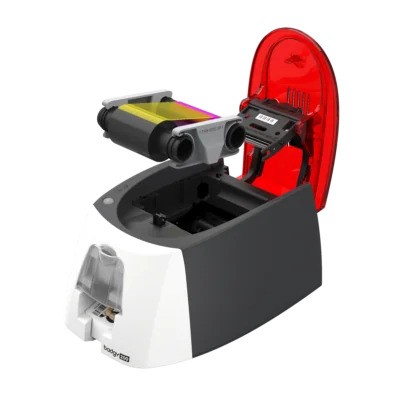
For businesses, schools, clubs, and events, professional ID cards and membership badges are more than just accessories—they are essential for branding and security. Outsourcing card printing, however, can be expensive and inflexible. That’s why many organizations are turning to the Badgy plastic card printer range, which offers compact, cost-effective machines capable of producing high-quality, full-color ID cards on demand.
In this guide, we’ll compare the Badgy100 color plastic card printer with the Badgy200 card printer to see which one suits your needs best.
Why Choose a Badgy Plastic Card Printer?
The Badgy series, created by Evolis, is designed specifically for small to medium organizations. Unlike industrial-grade printers that are expensive and complex, the Badgy plastic card printer is:

- Affordable: Lower entry cost than heavy-duty alternatives.
- Compact: Fits easily on a desk or reception counter.
- User-friendly: Comes with software for easy card design.
- Professional: Produces vibrant, full-color ID cards with photos, text, and logos.
- Efficient: On-demand printing means no waiting for third-party vendors.

From staff badges and student IDs to loyalty and event passes, Badgy printers provide a reliable, professional, and affordable solution.
Badgy100 Color Plastic Card Printer: Features & Benefits
The Badgy100 color plastic card printer is the entry-level model, perfect for organizations with light printing needs.
Key Features:
- Annual Capacity: Up to 500 cards.
- Print Speed: About 35 seconds per card.
- Resolution: 260 x 300 dpi, suitable for clear photos and logos.
- Connectivity: USB only.
- Software: Evolis Badge Studio (basic version).
Benefits:
- Budget-friendly for schools, clubs, or small offices.
- Compact and lightweight for easy setup.
- Simple plug-and-play installation.
- Produces professional-quality student IDs, visitor passes, and membership cards.
The Badgy100 color plastic card printer is ideal for low-volume printing without compromising on print quality.
Badgy200 Card Printer: Features & Benefits
The Badgy200 card printer is the upgraded version, offering more advanced features and higher capacity for growing businesses.
Key Features:
- Annual Capacity: Up to 1,500 cards.
- Print Speed: Around 38 seconds per card.
- Print Finish: Edge-to-edge printing for a polished, professional look.
- Resolution: 260 x 300 dpi with sharper color saturation.
- Connectivity: USB and Ethernet.
- Software: Evolis Badge Studio Plus with advanced design tools.
Benefits:
- Produces edge-to-edge full-color cards for a premium finish.
- Higher print volume supports regular use.
- Network connectivity makes it shareable across departments.
- More advanced software options for branding and card customization.
The Badgy200 card printer is the stronger choice for businesses or schools with frequent ID card printing needs.
Badgy100 vs Badgy200 Card Printer Comparison
Here’s a side-by-side comparison of the two models:
|
Feature |
Badgy100 Color Plastic Card Printer |
Badgy200 Card Printer |
|
Annual Volume |
Up to 500 cards |
Up to 1,500 cards |
|
Print Speed |
~35 seconds per card |
~38 seconds per card |
|
Print Finish |
Standard, not edge-to-edge |
Edge-to-edge, professional |
|
Connectivity |
USB only |
USB + Ethernet |
|
Software |
Badge Studio (basic) |
Badge Studio Plus (advanced) |
|
Best Use Case |
Small offices, schools, clubs |
Medium businesses, events, organizations |
Both printers deliver strong results, but your choice depends on your expected print volume and whether edge-to-edge professional quality is a priority.
Who Should Use a Badgy Plastic Card Printer?
The Badgy plastic card printer range is ideal for organizations that don’t require industrial-scale printing but still want professional-quality ID cards.
- Schools & Universities: Student IDs, staff badges, and library cards.
- Corporate Offices: Employee IDs and visitor passes.
- Clubs & Gyms: Membership cards and loyalty rewards.
- Events & Conferences: On-demand attendee badges and access cards.
- Retail: Gift cards, discount cards, and branded loyalty programs.
The Badgy100 color plastic card printer is perfect for small-scale operations, while the Badgy200 card printer is suited for medium-sized organizations.
Cost Considerations
Both models are affordable compared to outsourcing, but costs vary:
- Badgy100 color plastic card printer: Lower upfront cost, designed for occasional use.
- Badgy200 card printer: Higher investment, but delivers better long-term value with higher capacity and professional finishes.
Consumables like ribbons and blank plastic cards are recurring costs to factor in. However, both models remain cost-effective solutions for in-house card printing.
Why Color Printing Matters
One of the biggest strengths of the Badgy series is its ability to print in full color. From vibrant logos to crisp staff photos, the Badgy100 color plastic card printer and the Badgy200 card printer ensure your IDs look professional and durable. Full-color printing also helps reinforce branding, making ID cards both functional and visually appealing.
Final Thoughts
The Badgy plastic card printer range is one of the best options for small to medium organizations in 2025.
- The Badgy100 color plastic card printer is budget-friendly, compact, and perfect for schools, clubs, and offices with light printing needs.
- The Badgy200 card printer delivers edge-to-edge, professional-quality cards with higher capacity, making it the better choice for organizations with frequent ID printing requirements.
When comparing the two, the Badgy200 card printer offers more long-term value, but the Badgy100 remains an excellent entry-level solution. Either way, a Badgy plastic card printer ensures you can create professional ID cards, badges, and passes quickly and affordably—right from your desk.





